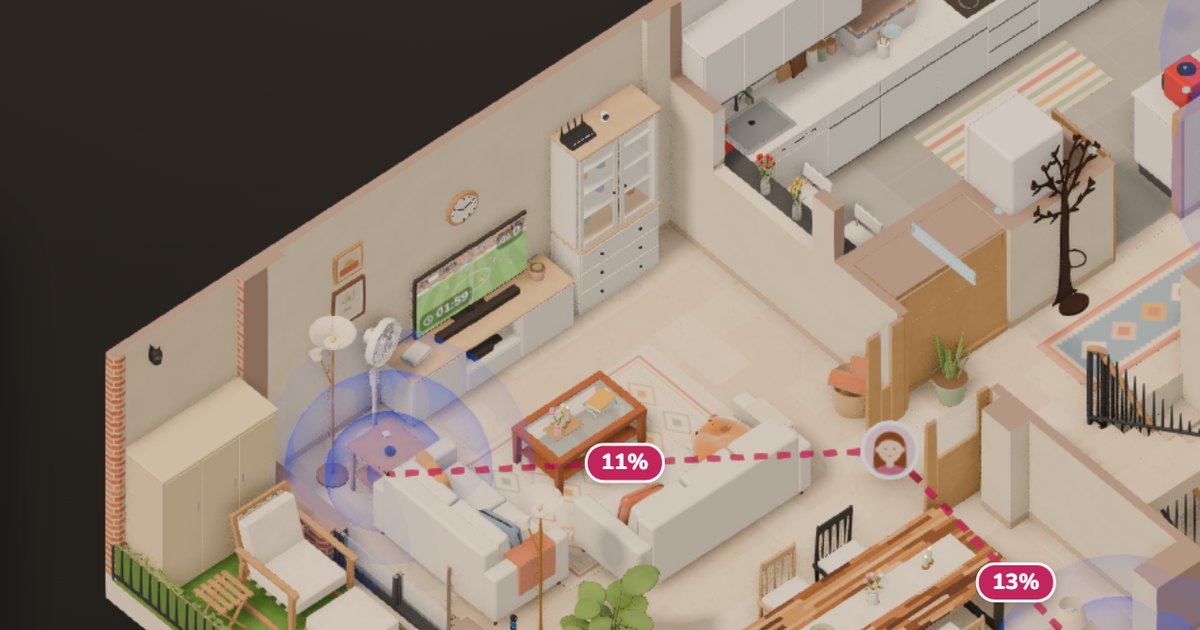
TL;DR: Home Assistant no longer just knows which room each of us is in: it knows the exact spot, to within about a meter and a half. And I can watch it live in the 3D house.
- With Bermuda, the more Bluetooth proxies I added, the worse it got: people jumped from room to room, and even from floor to floor.
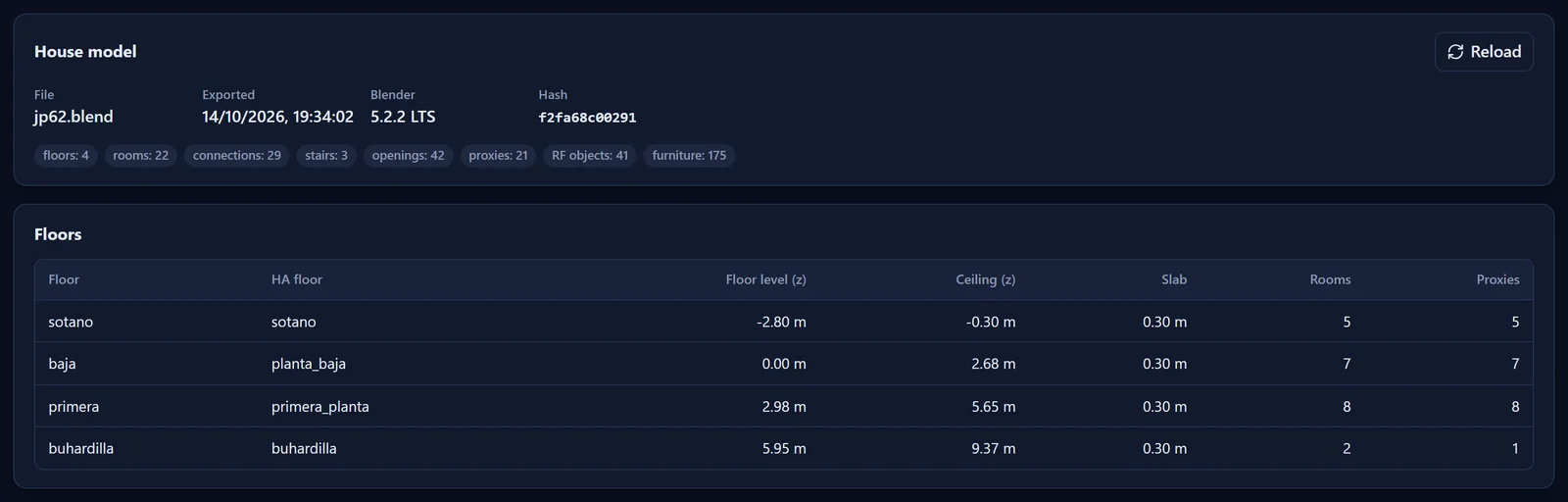
- Since I already had the house in 3D, with every wall, every floor slab and all 21 proxies where they really are, I built my own engine. It works out what signal each proxy should hear from every point in the house and compares it with what it actually hears.
- You can teach it: stay in one spot with your phone for a while and it learns what that spot sounds like.
- It reads Bluetooth through a Home Assistant integration of my own. It doesn’t depend on Bermuda at all.
- It publishes each person’s area, floor, confidence and X, Y, Z coordinates to Home Assistant, and the 3D house draws them.
- Everything runs at home, in Docker. I built the core in two days, with AI.

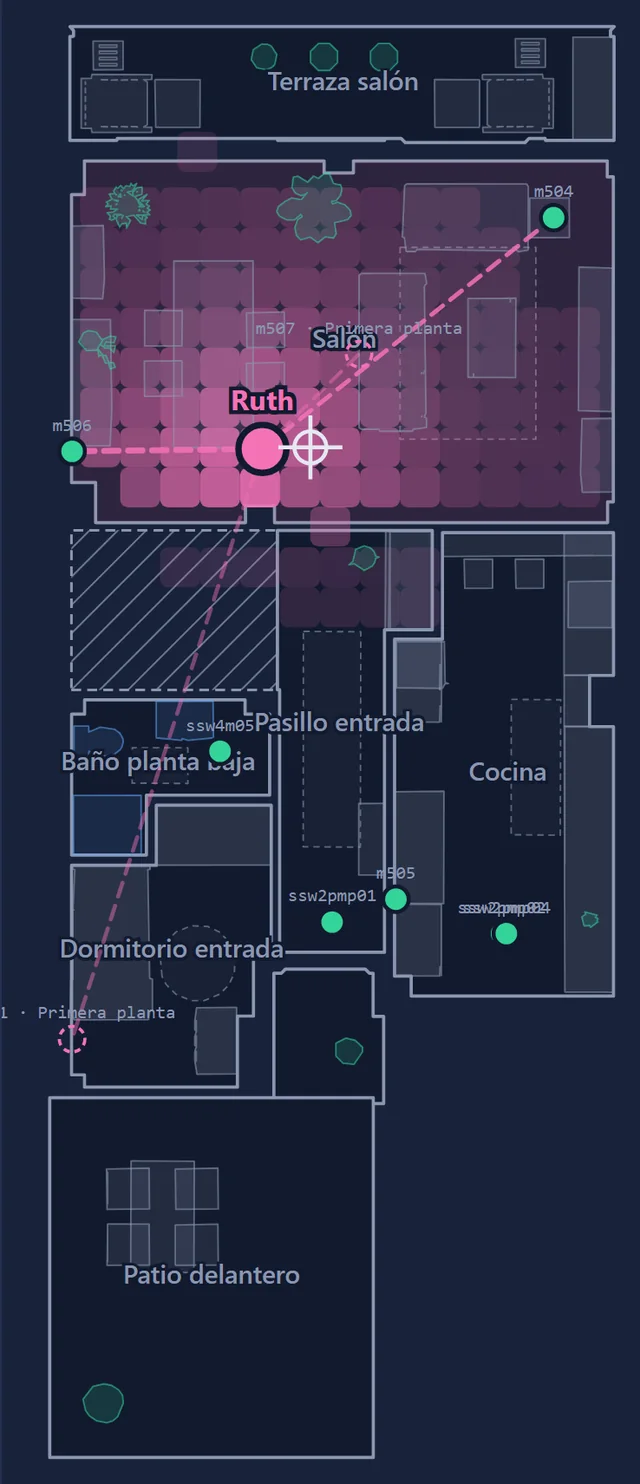
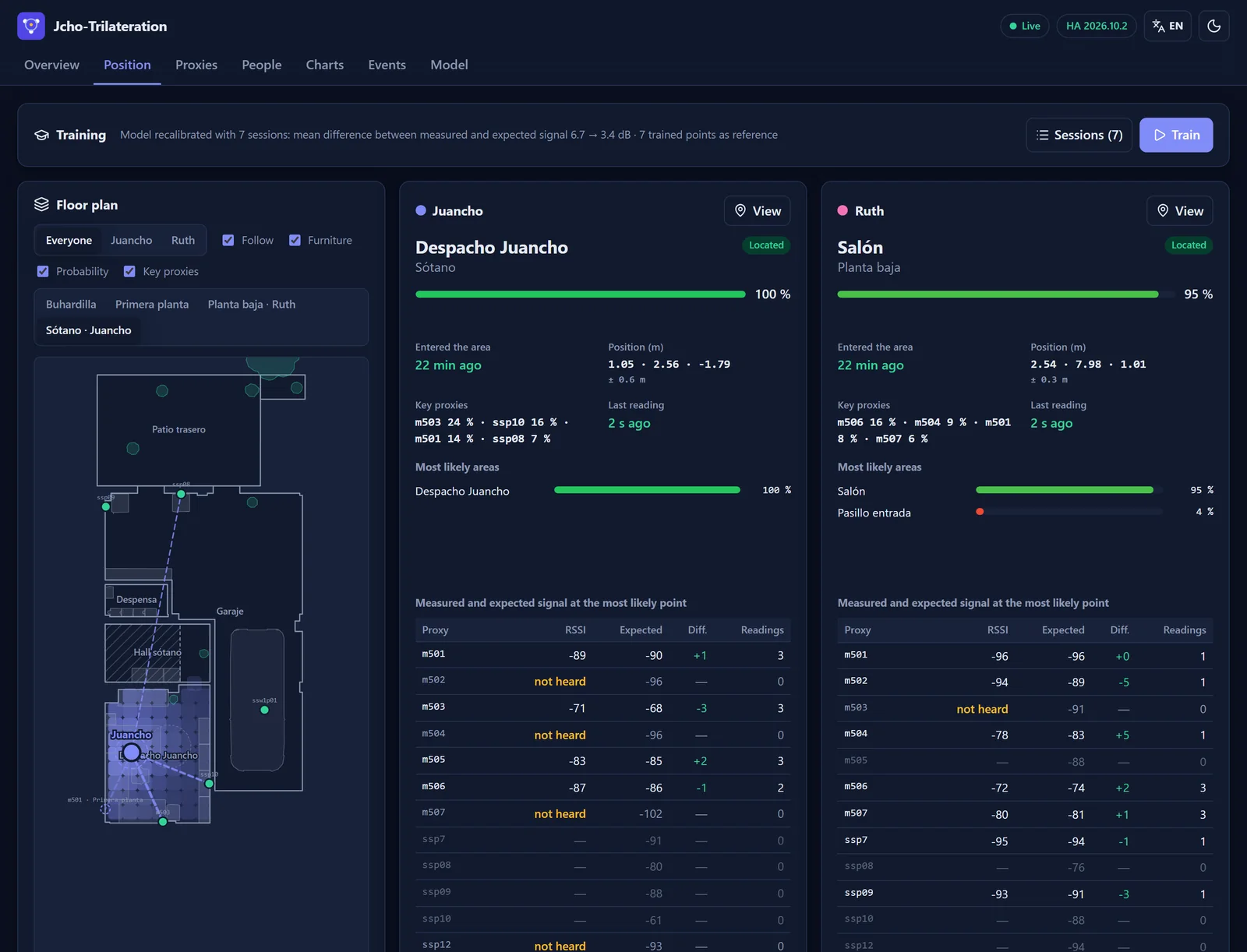
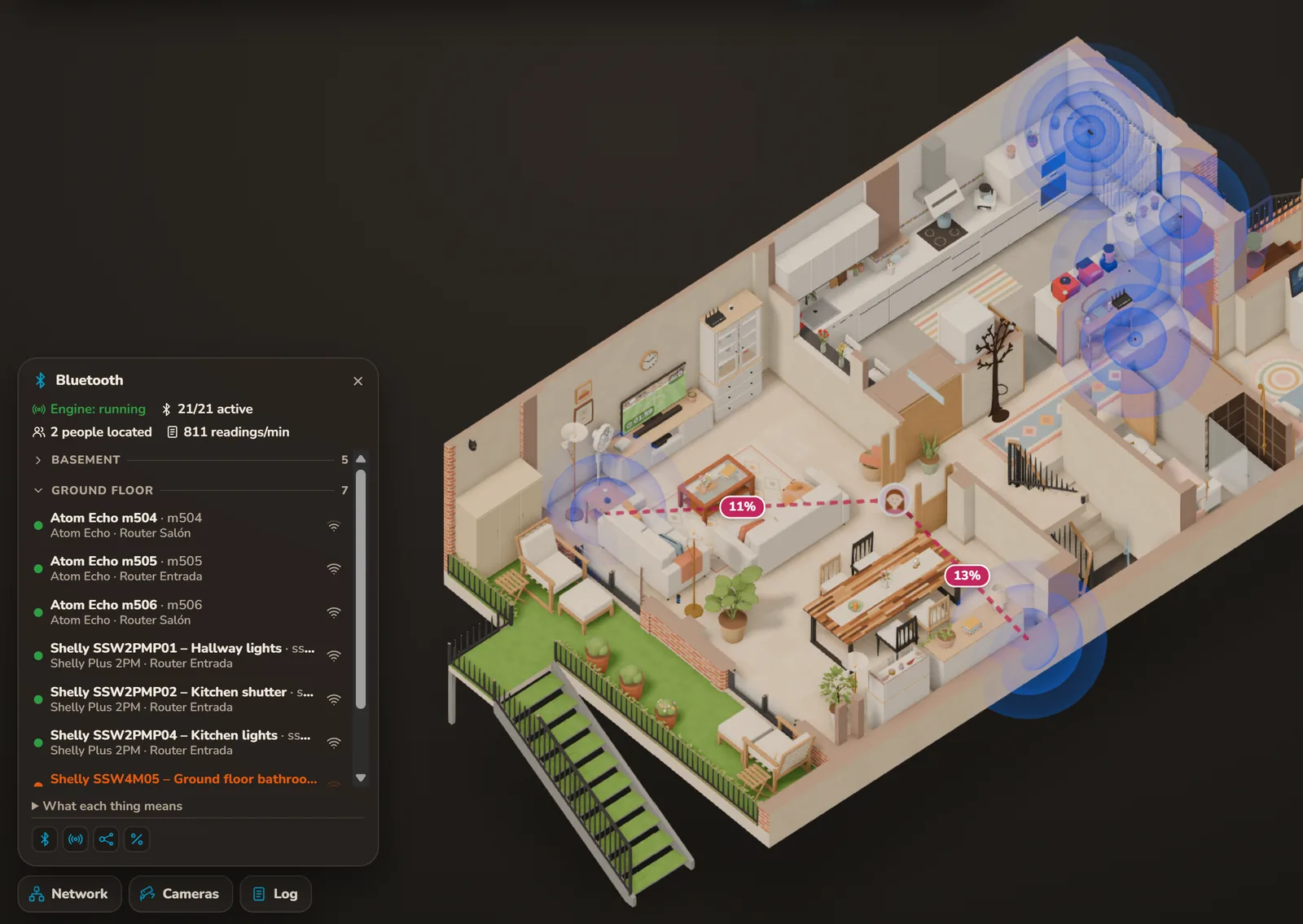
While I take the screenshots for this post, I’m in my office, in the basement. In the 3D house, my circle sits next to the desk, with dashed lines running from it to the Bluetooth proxies that weighed most in placing me there: the office’s Atom Echo, 25%; the smart plug on the LEGO shelves, 14%… Upstairs, Ruth is in the living room. If she gets up and goes to the kitchen, a few seconds later her circle glides over there.
Knowing the room wasn’t enough
In the 3D house post I said I knew which room everyone was in thanks to Bermuda BLE Trilateration, a very popular Home Assistant integration. Three days after publishing it, that was no longer true.
Bermuda listens to our phones’ Bluetooth through Home Assistant’s proxies: devices spread around the house that hear the Bluetooth signals around them and pass them on. I started with four Atom Echo units, tiny ESP32 boards running ESPHome, and it worked reasonably well. Logic said more proxies would make it better. So I enabled more.
It got worse. People kept jumping from one place to another. The clearest case was the living room: it has a proxy and, right above it, the bedroom has another, with a floor slab in between. Sitting on the sofa, I’d flip from the ground floor to the first floor and back.
The obvious question: if it’s called BLE Trilateration, how can it not trilaterate? Well, it doesn’t. Its own README says so: it locates by room, and working out a position on a map is left for later: “(eventually) Triangulate device positions! Like, on a map. Maybe.” To pick the room, Bermuda goes with the proxy that seems closest, with a small margin before switching. It doesn’t combine what the others hear, and it doesn’t know there’s a floor slab between two floors. And with many proxies, each one is like a lottery ticket: there’s almost always one that wins thanks to a spike of noise. That’s why the more I added, the worse it got.
For the record: Bermuda is a great project and it served me well. I started with it and I compared against it. But I wanted something else:
- Not just the room, the spot too: X, Y, Z coordinates inside the house.
- No jumping around, and above all no jumping between floors.
- With its confidence: knowing when it’s sure and when it’s in doubt.
- For the 3D house to draw everyone where they actually are, not in a fixed spot in their room.
How it works, at a glance
Before getting into the details, the whole journey, from the house in Blender to each person in their place:
For the techies: the stack
- Exporter: Blender 5.2 as a Python module (
bpy) inside a container, with Shapely for the outlines. It produces the house as JSON, lightweight geometry as GLB and the propagation table in NumPy. - Engine: Python with asyncio: aiohttp for the API and the web app, aiomqtt for MQTT, NumPy for the filter and Pydantic to validate the configuration.
- Integration: a Home Assistant custom integration with its own WebSocket command, tested with
pytest-homeassistant-custom-componentpinned to the Home Assistant version. - Web app: React 19 with Vite and uPlot for the charts, live over Server-Sent Events and served by the engine itself.
- Data: raw readings in daily JSONL files; history in SQLite; what it learns, in separate JSON files. The configuration, in a single YAML file.
- Deployment: Docker on a home server, behind a reverse proxy with authentication.
The advantage: the house was already in 3D
To work out where someone is from what each proxy hears, you need two things: to know where each proxy is and to know what’s in between. And I already had both.
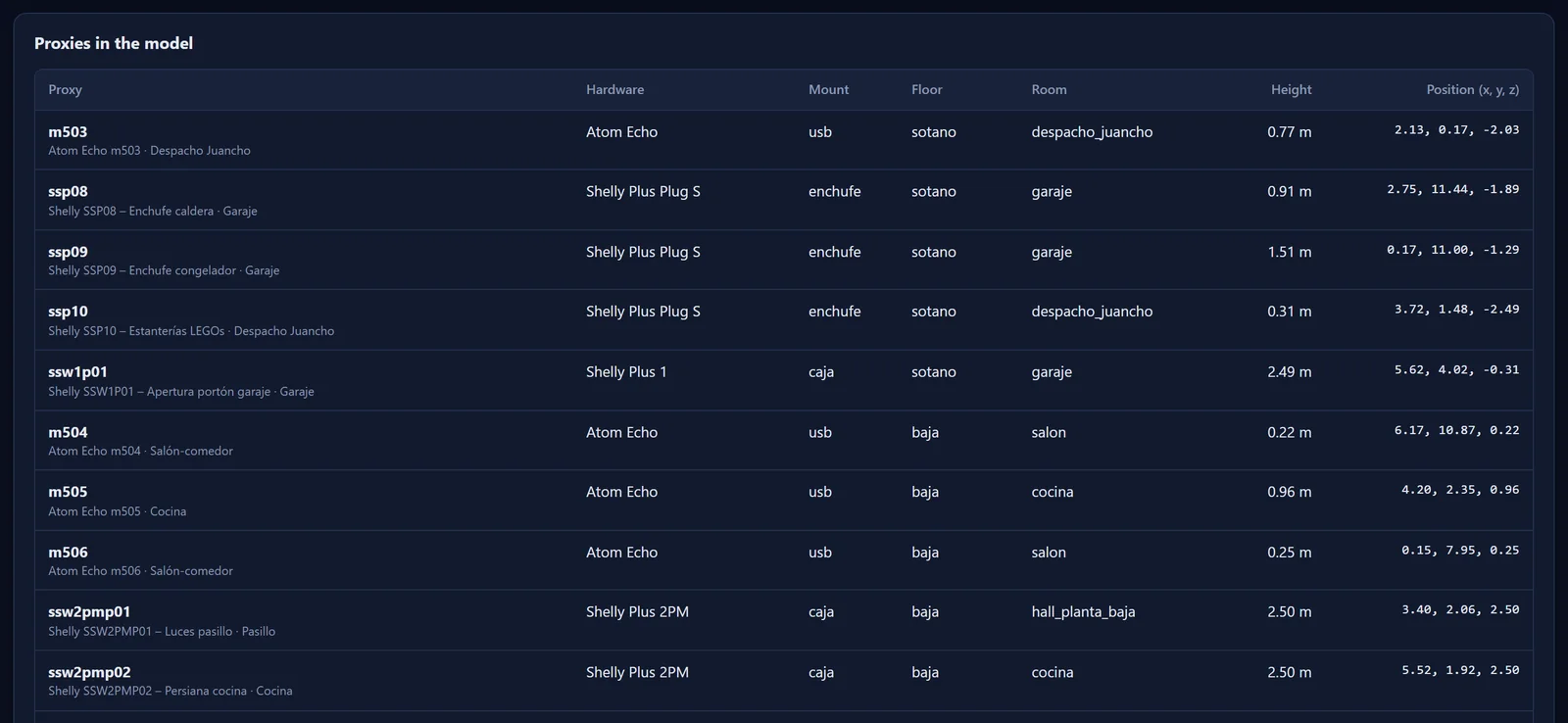
The 3D house comes from Python scripts that build the Blender model from scratch, so the model knows where every wall, floor slab, door, staircase and piece of furniture is, even the false ceilings. All it was missing was the proxies. I added them where they really are: the smart plugs in their sockets, the relays in the false ceiling and the Atom Echo boards hanging from their USB cable or sitting on a shelf.
21 in total: 14 Shelly devices and 7 Atom Echo boards, spread across the four floors. And here’s a detail I love: the 14 Shellys were already in the house doing something else. They switch lights, raise shutters, open the garage door or measure what the boiler uses. Turn on their Bluetooth and they work as proxies at no extra cost.
An exporter opens the Blender file (with Blender running inside a container) and pulls out what the engine needs:
- Floors and rooms, with their outlines, already linked to Home Assistant’s floors and areas.
- Doors, with the rooms they connect, and stairs, with the floors they connect.
- The proxies, with their position and height.
- Whatever blocks the signal: walls, floor slabs, doors and windows, but also the fridge, the oven, mirrors, TVs or wardrobes.
From that it builds a grid of points every 50 cm, only where you can walk, and a table: for each proxy and each point, the distance and everything in between. It’s the map everything else starts from.
Good data first
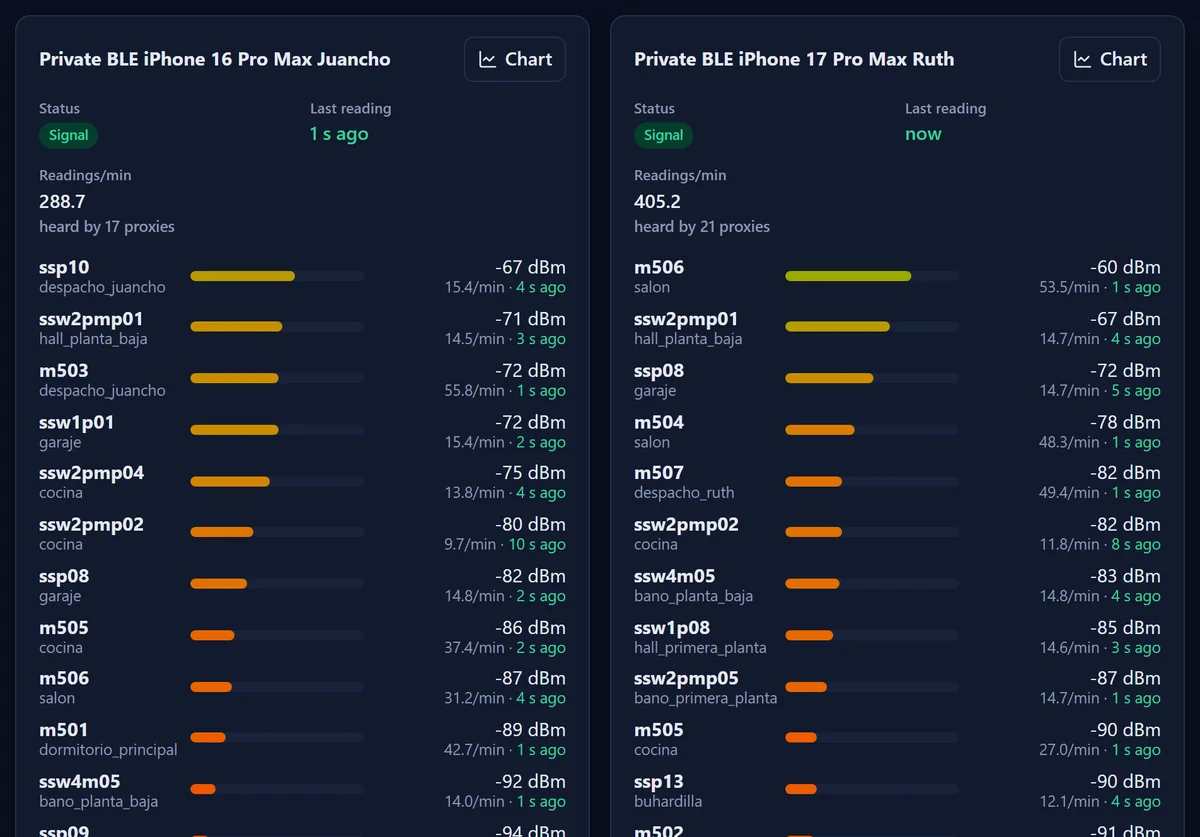
Before thinking about algorithms, I looked at what was coming in. And very little was: for each person, between 15 and 18 readings per minute, and only 3 proxies heard them. No algorithm can do much with that.
Two settings fixed it:
-
ESPHome (the Atom Echo boards): listen 100% of the time. Mine were listening for 30 ms out of every 320 ms, 9% of the time, which was the default in their version. Recent ESPHome versions already default to 100% on Wi-Fi devices, but it’s worth checking:
esp32_ble_tracker: scan_parameters: interval: 320ms window: 320ms -
Shelly Gen2 and later: Bluetooth scanner in “Auto” mode. You change it in Home Assistant, in each Shelly’s options (Bluetooth scanner mode).
Result: each person went from 15–18 to around 250 readings per minute, and from 3 to 14 proxies hearing them. Today, with all 21, sometimes every one of them hears us and over 500 readings per minute come in. If you use Bermuda, this tip works for you too.
They don’t all hear the same, either. Real readings showed that a Shelly Plus 2PM hears about 12 dB less than an Atom Echo at the same distance, so the engine corrects each proxy according to its model.
From noise to a position
This is what comes in:
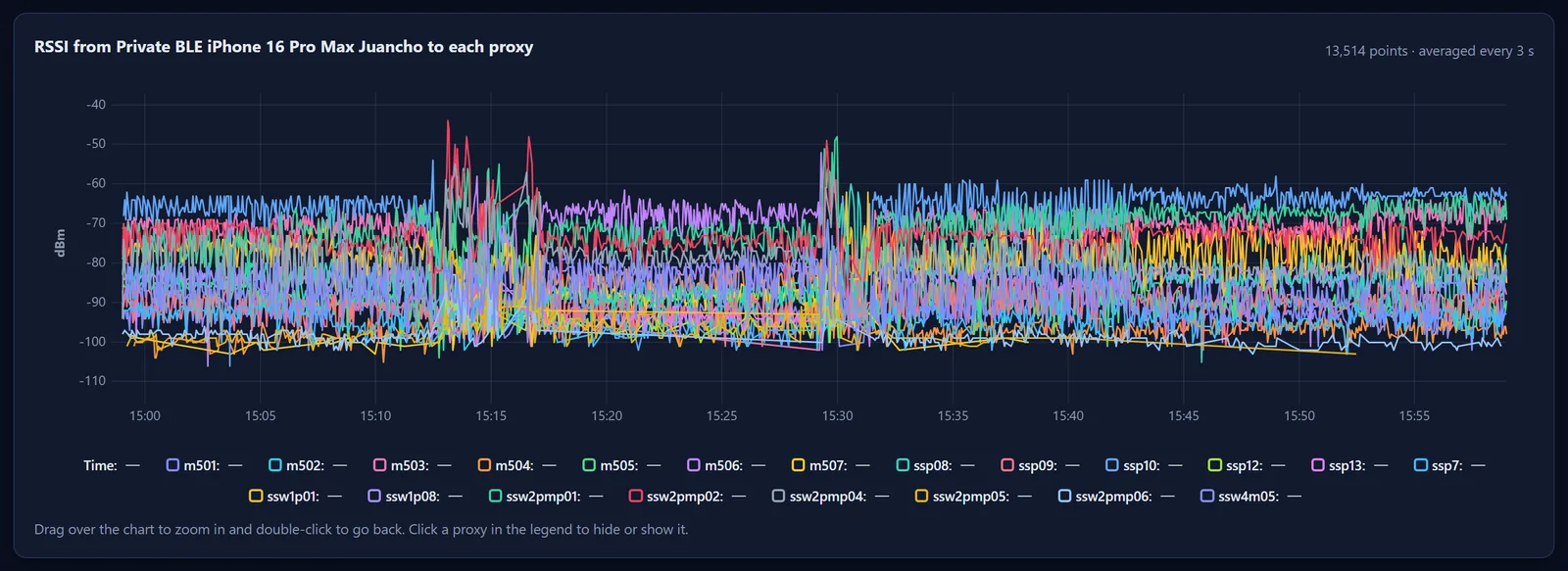
The lines swing 10 or 20 dB from one second to the next even if you don’t move: your body blocks it, the signal bounces, the phone shifts position. Trying to get the distance to each proxy out of that and intersect circles, textbook style, doesn’t work.
So the engine turns the question around. It doesn’t ask “how far am I from each proxy?” but, for each point in the house: “if I were here, what should each proxy hear?” And it keeps the points where what should be heard comes closest to what is heard.
The expected signal comes from good old physics and from what the 3D model says:
The values came from real readings in my house, and there were surprises. Theory says a floor slab eats about 20 dB; here, about 7. And what matters is how many walls you cross, not how thick they are.
One second in the life of the engine
The result isn’t a point but a cloud: the probability that the person is at each point of the grid. Every second, the engine updates it in four steps:
Inside the room, the exact spot comes from the signal accumulated over the last minute: if you stay still, it gets sharper; if you move, it takes a moment to catch up.
Those lines are the key proxies: the four that weigh most in the engine placing you here and not somewhere else. And they’re not necessarily the ones that hear you loudest. When I’m in the office, one of mine is the bedroom one, two floors up: it barely hears me, and that’s precisely why it helps rule out that I’m up there.
A note for purists: technically this isn’t textbook trilateration but a Bayesian filter over a grid. But it does what you’d expect from the word: it uses what all the proxies hear at once to get a position.
For the techies: the model in detail
- Propagation: log-distance model with exponent 2.4 and a loss for every crossing of each kind of obstacle (wall, floor slab, stairs, roof, frames, door, window, metal, mirror, screen, sanitary ware, wood). The distances and crossings from each proxy to each point are precomputed at export time.
- Cascading corrections: each proxy inherits the defaults, then those of its hardware model and, if needed, its own.
- Readings: median of the last 3 s per proxy, with a robust likelihood that tolerates absurd readings and is “softened”, because consecutive readings aren’t independent: same body, same bounces.
- Motion: along the grid’s edges, with a maximum speed of 1.5 m/s and symmetric (Metropolis) weights, plus a small probability of “appearing” anywhere to recover from errors.
- Absences: a live proxy that hasn’t heard the person for 15 s penalizes the points where it would expect to hear them above −88 dBm.
- Phone level: at each point, a common offset of the phone across all proxies is estimated; that way what counts is how the signal is spread across proxies, not its absolute level.
- Decision: hysteresis via minimum probability, margin and dwell time before publishing an area change.
Teaching it the house: training
The physical model is a good starting point, but every house has its quirks: a mirror, a built-in wardrobe, a fridge right in the way. That’s what training is for.
In the engine’s web app you pick a person, a room (or click the exact spot on the floor plan where you’ll be) and how long; 10 minutes by default. You press Start and stay there with your phone the way you always carry it. While it runs, you see how often it gets it right and, if you picked an exact spot, the error in meters.

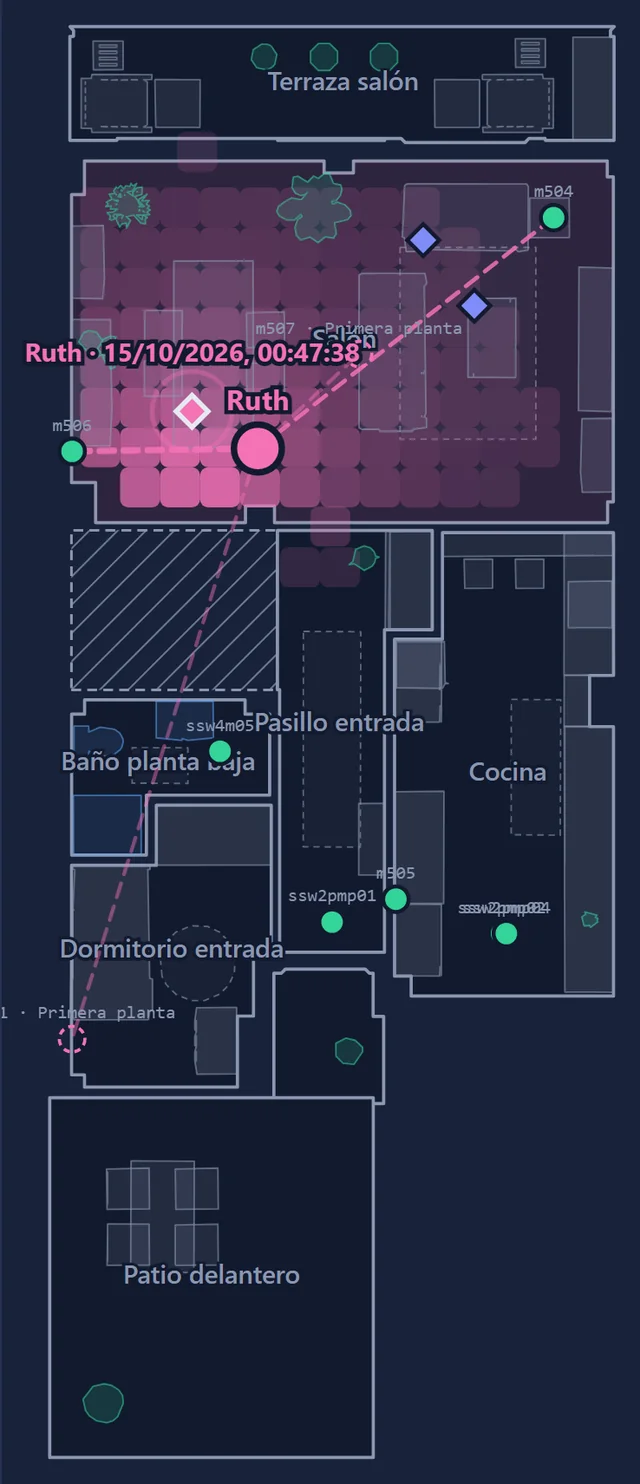
With what it learns, it does two things:
- It recalibrates the model. Using all the sessions, it fits by least squares the correction for each proxy, for each phone and for each kind of obstacle, plus the distance loss. All tied to the starting values: with little data, they barely move. Whatever still doesn’t add up in a room stays as a small adjustment for that room and that proxy.
- It stores references. Each session at an exact spot becomes a fingerprint: at that spot, the engine expects exactly the signal it measured there, and up to a meter and a half around it, it blends that with the calculated one. That way it recognizes the spot even when physics can’t explain it. It also remembers which proxies didn’t hear you there.
In my house, 7 sessions brought the mean difference between measured and expected signal down from 6.7 to 3.4 dB. And at one of Ruth’s trained spots, remembering which proxies don’t hear her cut the mean error from 0.74 to 0.59 m.
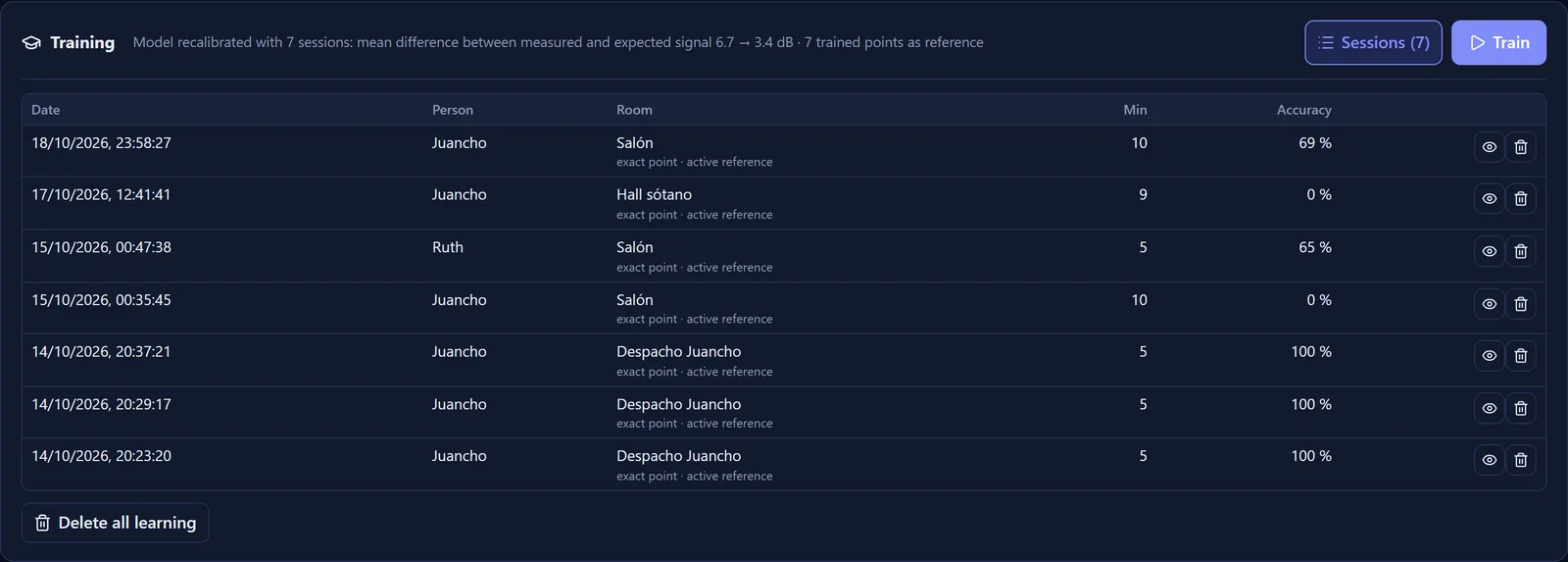
My advice: train first where it gets most confused, like rooms stacked on top of each other, and then a couple of minutes in your usual spots: the sofa, the table, the bed.
How accurate is it?
Against Bermuda
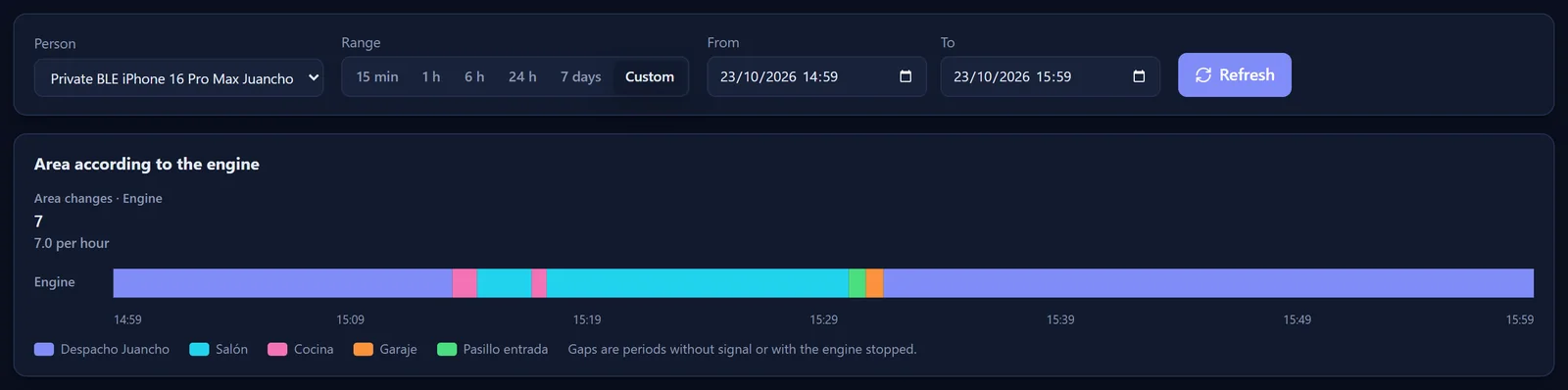
One afternoon, for an hour and a half, Bermuda and my engine ran side by side on the same readings, and the engine logged what each one said. My engine didn’t have a single training session yet.
| Per hour | Bermuda | My engine |
|---|---|---|
| Room changes, me | 38.4 | 6.8 |
| Floor jumps, me | 15.5 | 1.9 |
| Room changes, Ruth | 78.6 | 1.9 |
And in total, between the two of us, Bermuda put us in a room for less than 30 seconds 157 times; my engine, 2.
The funny thing is that most of the time they agreed on the room: 88% of the time for me and 77% for Ruth. Bermuda didn’t get the place wrong that often: what it did was jump around. With me it changed rooms every minute and a half and, with Ruth, every 45 seconds.
The room and the spot
Nobody at home writes down where they are at every moment, so I used Home Assistant’s other sensors as witnesses: the presence sensors and the indoor cameras, which detect people with Frigate. With the engine as it is today:
- In the office, 97%. During the times I was home alone and the office presence sensor was detecting me, the engine had me there 97% of 6.7 hours.
- In the living room, 98%. While the living room camera saw someone, the engine had one of us there 98% of 19.5 hours.
- The floor, over 90%. And whenever any indoor camera saw someone, 34 hours in total, the engine had one of us on that floor more than 90% of the time.
For the spot inside the room I do have an exact ground truth: the 7 spots where I trained, marked on the floor plan to the centimeter. I ran those sessions through today’s engine again, but without the training, as if they were new spots:
- At 4 of the 7, the mean error is between 1 and 1.3 m. Three are in the office and one in the living room.
- At the other 3, between 2 and 3 m. They’re exactly the ones I trained because it failed there: two spots in the living room and the basement hall.
- At a spot that’s already trained, it drops to about 60 cm. At Ruth’s, the mean error is 0.59 m, and 9 times out of 10 it’s within 0.82 m.
In short: around a meter and a half at any spot, and quite a bit less at the ones you’ve taught it.
The best part is that I don’t have to trust my gut. The engine records every reading and can replay any stretch of time with different settings: I tell it “from this time to that time I was in the office” and it tells me how often it got it right. I test every change to the engine like this against real days before rolling it out.
To understand why the engine decides what it decides, its web app shows, for each person and proxy by proxy, the incoming signal against the one it expected at the most likely point, and flags the proxies that should hear the person and don’t.
My own Home Assistant integration
At first, the engine got its readings from Bermuda: it has a service, bermuda.dump_devices, that returns what each proxy hears from each phone. And honestly, writing my own integration didn’t appeal to me: I’d rather not touch Home Assistant. I ended up writing it the same day.
Why? For each proxy, Home Assistant keeps the latest Bluetooth advertisement from each device. But to the outside world it only offers the one from the proxy that hears each device best, and to locate someone you need what all of them hear. Bermuda solves this by being an integration that lives inside Home Assistant. So I did the same: jcho_trilateration.
- What it does: every second it checks all the proxies and sends the engine anything new from each phone it tracks: the time, the phone, the proxy and the signal.
- How: the engine subscribes with a Home Assistant WebSocket command, admin only. If no engine is connected, the integration does nothing. It only uses public Home Assistant APIs, has no options and creates no entities.
- Privacy: iPhones change their Bluetooth address every so often, and Home Assistant recognizes them by their IRK, a key from the phone itself, thanks to Private BLE Device. The IRK never leaves Home Assistant: the engine only gets a pseudonym.
Before removing Bermuda, I had both running at once: in 3 minutes, Bermuda delivered 2,493 readings and my integration 2,523. I uninstalled it, and today the system doesn’t depend on Bermuda at all.
What worried me most was maintenance: a Home Assistant update breaking it. Its automated tests use the exact Home Assistant version and fail if the integration uses anything Home Assistant has marked as deprecated, which it announces months in advance. Before updating Home Assistant, I run the tests against the new version.

What reaches Home Assistant
The engine publishes to Home Assistant over MQTT, with auto-discovery. For each person a device appears, “Trilateración Juancho”, with these entities (their names are in Spanish, like the rest of my Home Assistant):
| Entity | What it says |
|---|---|
sensor.trilateracion_juancho_area |
The Home Assistant area they’re in. In its attributes, the candidates with their probability |
sensor.trilateracion_juancho_planta |
The floor |
sensor.trilateracion_juancho_confianza |
How sure it is, in % |
sensor.trilateracion_juancho_x, _y, _z |
The position, in meters, on the same axes as the 3D house |
sensor.trilateracion_juancho_proxies_clave |
The four proxies that weigh most in locating them, with their weight |
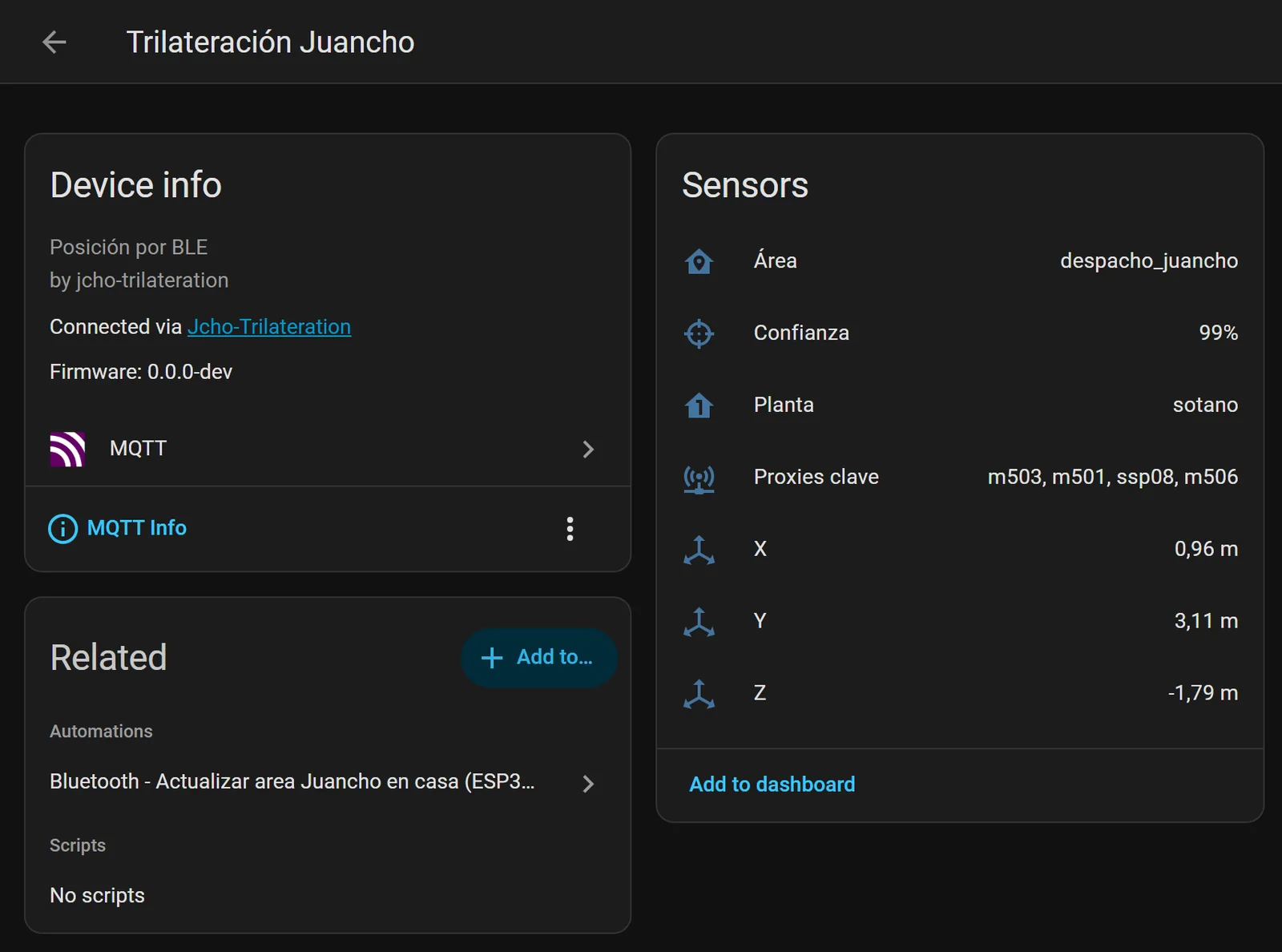
On top of that, a diagnostics device says whether the engine is connected, how many proxies are active and how many readings per minute are coming in.
To avoid flooding Home Assistant’s history, the position is only republished if you move at least 25 cm or the confidence changes by 5 points, and at most every 5 seconds. A change of room or floor, on the other hand, is published right away. Even so, I keep almost all of them out of Home Assistant’s history, because the engine already keeps its own:
recorder:
  exclude:
    entity_globs:
      - sensor.trilateracion_*_area
      - sensor.trilateracion_*_x
      - sensor.trilateracion_*_y
      - sensor.trilateracion_*_z
      - sensor.trilateracion_*_confianza
      - sensor.trilateracion_*_proxies_clave
      - sensor.trilateracion_lecturas_por_minuto
What I do with them
There are no grand automations, just lots of small ones that depend on knowing where we are. And almost all of them predate the engine: I only changed where the area comes from.
- The air conditioners turn themselves off if nobody’s using their floor. To know whether a floor is in use, Home Assistant combines the phones the engine places there with motion, TVs and lights. If a floor has been empty for 15 or 20 minutes and its AC has been on for at least an hour, it switches it off.
- The decorative lights on the ground floor. The Christmas tree turns on when someone has been downstairs for a few minutes and off when nobody’s left. The pineapple lamp, and the dining room light at two in the morning, only turn off if nobody’s left downstairs.
- The home dashboard shows which room each of us is in.
- Assist knows: I can ask it whether anyone’s on the ground floor.
- If the engine stops, Home Assistant reloads the integration and, if it still doesn’t work, sends a notification to my phone.
In the 3D house
This is where it all comes together. The 3D house reads those entities and places each person, a circle with their Home Assistant photo, at their coordinates and at their height. If they move around the floor, the circle glides; if two people are close together, they sit side by side; and on the stairs, they appear on the floor that matches their height.
With “Show → Bluetooth proxies”, you also get:
- Each proxy in its place, sending out blue waves, blocked by whatever blocks them.
- Dashed lines from each person in their color to their key proxies, thicker the more they weigh and with their percentage in the middle.
- A Bluetooth panel: whether the engine is running, how many proxies are reporting, how many people are located and how many readings per minute, with the list of proxies by floor. Click one and it takes you there.
Built with AI
Like the 3D house, I built this with AI agents in GitHub Copilot, but this time with a single model: Claude Opus 5.5.
The rules, similar to the 3D house’s:
- Nothing hard-coded. Every value goes in the configuration file. And if one is missing or there’s an unknown one, the service won’t start and says exactly what’s wrong.
- Secrets kept apart. The Home Assistant token lives in its own file, never in the code or the logs.
- Hands off the server. Everything runs in containers: the tests, the web app and even Blender.
- Deterministic tests. No sleeps, and no tests that pass sometimes and fail other times.
- Before a big change, the plan. Explain it to me and wait for my go-ahead.
The hard parts, and what still fails
- The phone in your pocket. If you change how you carry it (in your pocket, face down, under a blanket), every proxy hears it weaker at the same time, and the engine read that as “they’ve moved away from all of them”. Ruth kept jumping from the living room to its terrace. Now the engine estimates how much the phone as a whole has changed and looks at how the signal is spread across proxies. With Ruth sitting in the living room, it went from being right 82.9% of the time to 99.7%. Even so, it’s still the hardest part.
- The ghost attic. When a phone went to sleep, we left the house or Home Assistant restarted, no proxy heard anyone. And the engine took those silences as clues: they pushed the cloud towards where no proxy hears well, the attic. In one day, it put me there for 44 minutes, and Ruth for 92. Now, if there isn’t enough signal, it freezes the cloud and keeps the area. Replaying that same day: not a single minute in the attic. What’s left: right when the signal comes back, it sometimes publishes a false spot for a few seconds; it happened to me with the living room terrace, for 30 s.
- Room centers were magnets. Points in the center have more neighbors than those in the corners, and probability kept piling up there. Fixed by spreading it symmetrically.
- Training one spot moved everyone else. Repeating a session at the same spot fed its pattern into the proxy corrections, which are shared by all phones… and moved the other person. Now, repeating a spot only refines that reference.
- Terraces and patios, not yet. They’re outside the house but right next to it, and few proxies hear them well.
Q&A
Where’s the code?
Not public for now. The engine knows nothing about my house in particular, but it needs a model of the house built like mine.
Do I need my house in 3D?
Yes. Today the engine starts from a Blender file with the walls, floor slabs, rooms and proxies in place. Without it, it doesn’t know what’s between each proxy and each point.
Does it work with Android?
It tracks the phones Home Assistant recognizes with Private BLE Device. We both have iPhones at home, so that’s all I’ve tested.
Does it drain the phone’s battery?
No. The phone doesn’t do anything new: the proxies listen to what it already broadcasts over Bluetooth.
How many proxies do you need?
There’s no magic number. What matters is that wherever you are, several of them hear you, and that they listen all the time. If you have floors stacked on top of each other, it helps to have proxies on all of them.
How much does it cost to run?
Nothing a month: it runs at home, in Docker. And 14 of the 21 proxies were already installed for other things.
What’s next
- Position-based automations: lights or music that follow you from room to room.
- More things to locate: watches, keys with a Bluetooth tag…
- Publishing the code, once it doesn’t depend on how my house’s model is built.
What about you? If Home Assistant knew which corner of the house you’re in, what would you automate first? Let me know in the comments.
Comments
via GitHub DiscussionsSign in with GitHub to join the conversation. Comments are public and stored in GitHub Discussions.